
Comic Canvas, A Diary That Draws Itself
I’ve always wanted to visualize my diary. Not just write it, actually see the day.
So I tried the obvious thing first: just describe my day to an image model and let it draw. And the images genuinely looked great, individually. The problem showed up the moment I put two days next to each other. The “me” in Monday’s panel and the “me” in Tuesday’s panel were basically two different strangers who happened to share a wardrobe. Different face, different build, sometimes a different person entirely. My diary was apparently about a large and rotating cast of characters, none of whom were me.
The workaround was writing a longer, more careful prompt every single time, describing my face, my hair, my build, all over again, hoping the model would land on something close enough. That took 10–15 extra minutes a day, on top of actually writing the entry, and every one of those long prompts cost more too. A diary tool that costs you 15 minutes and real money per entry is not a diary tool anyone keeps using, including me.
So I built Comic Canvas. Type a few lines about your day, get a four-panel comic strip with a version of you that actually looks like the same person every single time. That consistency is the whole headline.
The other part I didn’t expect to get attached to: it learns your taste. Four taps a day, one per panel, pick your favorite of three options, and a small model quietly starts leaning your strips toward what you actually keep choosing. Warmer light, closer framing, calmer expressions, whatever it turns out you like. Nobody told it that in advance. It noticed, which is more than I can say for most people I’ve told about this project.
The shape of it
Three stages, and the third one feeds back into the first: your diary text becomes a prompt, the prompt becomes an image, and every tap you make on that image nudges tomorrow’s prompt a little closer to your taste. That loop of drawing, watching what you pick, and adjusting is the entire idea. Everything below is just what’s actually inside each of those three boxes.
Stage 1, from words to a prompt
Your raw text gets pulled apart into beats: what happened, where, when, how it felt, and a script agent picks four of them to become panels. Each panel’s prompt is then built in two layers, a character clause that’s identical every single time (the same face, hair, build, phrased the same way) and an environment clause that’s free to change (the kitchen, the gym, the light, the time of day). The character clause never varies panel to panel or day to day, and that’s where the consistency actually comes from, before the image model has even been called.
Stage 2, actually generating a face that stays the same
The obvious way to get a consistent face is to train a small custom model on your own photos, a LoRA, fine-tuned to draw you specifically. So that’s what I tried first: FLUX.1-dev as the base, a rank-32 LoRA adapter on top, 2,000 real training steps at a constant 1e-4 learning rate, AdamW8bit, EMA-smoothed. Nothing exotic, just a real fine-tuning run with a checkpoint saved every 250 steps so the best one could be picked automatically rather than just trusting the last one.
It didn’t work well enough. With a training set of 35 stylized images built from my own photos, the results were close but never reliably right. One panel would nail it, the next would land on the wrong hair color, and the one after that would come back with a face shape that wasn’t quite mine, plausible strangers, not portraits of me. I scored every one of the 9 checkpoints automatically and picked the best of the batch, and the honest number was still 0% on the identity checklist. I tried tuning the training run itself more than once, and the ceiling didn’t move. The real bottleneck was data, not settings, and getting meaningfully more of my own photos wasn’t a real option (there are only so many angles you can photograph yourself from before it stops being research and starts being a phase).
The fix ended up being simpler than training anything: skip fine-tuning entirely.
Design one approved master image of the character up front, and instead of training a model to remember a face, hand that master image to an edit model, Flux Kontext specifically, alongside the day’s own prompt, every single time. Zero training steps, one inference call per panel, a few cents of API cost a day. The model isn’t recalling a face from weights anymore. It’s looking at an actual reference image and editing a new scene around it. That’s a much easier problem for it to get right consistently, and it shows: three real panels from three genuinely different days (a morning jog, a laptop session, a cricket match), and the same face holds in every one, a 3-for-3 pass rate on the identity checklist.
The master image itself matters more than it sounds like it should. It’s not just a nice starting portrait. Every one of the hundreds of panels this app will ever generate for you points back at that one file. It’s the actual source of the consistency, not the prompt wording. Treat it with the respect you’d give a passport photo, because in a sense that’s exactly what it is.
Stage 3, learning what you like
Every panel is drawn three slightly different ways (warmer, as usual, cooler), and you tap the one you like. That single tap is genuinely richer than it looks: your pick beat both other options, so it teaches the model two comparisons at once, not one. Efficient, in the way that only mildly manipulative UX can be.
A few small, deliberately unglamorous algorithms run underneath that tap:
- A Bayesian model, not a big one. There are only ever a handful of taps to learn from, so the model keeps a belief (a mean and a “how sure am I” band) for each thing it might be tracking, and narrows that band with every tap instead of needing thousands of examples.
- Deliberate exploration. Every so often it shows you an option away from its current best guess on purpose, specifically so it can find out if that guess is actually right, instead of locking onto a lucky early streak and never checking again.
- Forgetting, on purpose. Older taps count for less over time. If your taste genuinely shifts, the model follows it instead of averaging it away against six months of old picks.
None of this is one big model doing everything. It’s a few small, specific tools, each solving one specific part of “learn from almost no data, without getting stuck.” No transformers were harmed in the making of this feature.
What that actually looks like on the Learning page
The idea above is abstract. Here’s the real page, built from actually running the app on my own days, and the real formula behind each piece of it, not just the vibe.

Four numbers, always visible: how many taps it’s learned from, whether it’s actually beating a plain hand-set ranking yet (not just matching it, beating it, on taps it predicted before seeing your answer), how often you picked the option it expected you to, and what it’s currently nudging your prompts toward. Every one of those four numbers is a real output of the math further down this page. This tile is just the summary before the receipts.
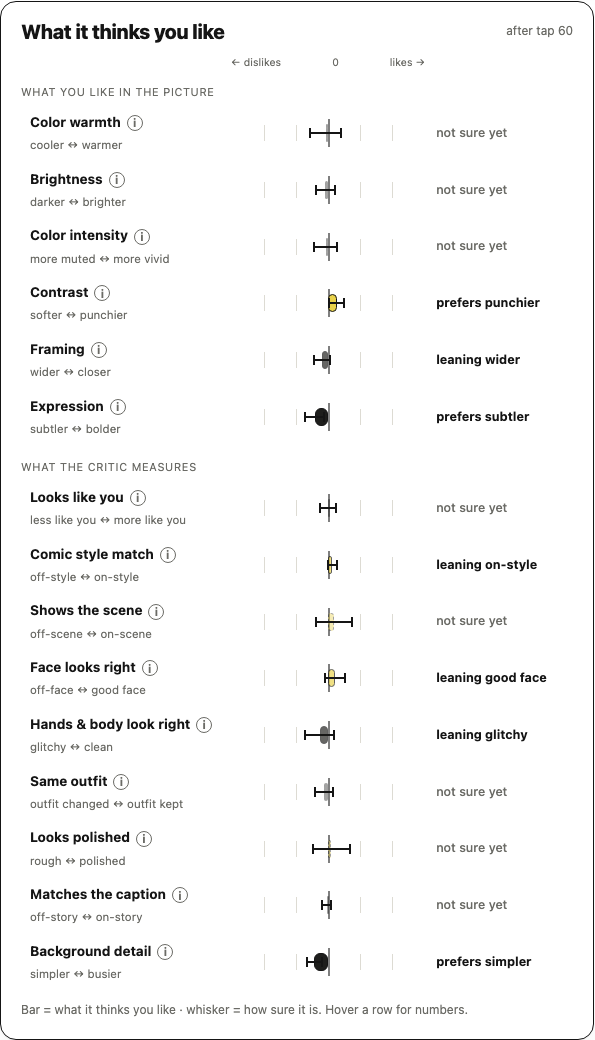
Every feature it tracks, things like color warmth, framing, how much you care about the background, whether the face actually looks like you, gets its own bar and a “how sure am I” whisker. A bar with a wide whisker means it genuinely doesn’t know yet; that’s shown honestly instead of guessing.
The bar itself is the weight w in one formula, and the whisker is that weight’s own uncertainty. Each tap compares a chosen image against a rejected one; with x as the difference in measured features between them, the model says:
P(chosen wins) = sigmoid(w · x)
Say your very first tap says warmer, so x = 1 on the warmth feature. Before any taps, w = 0, so the model genuinely can’t tell: sigmoid(0) = 0.50, a coin flip. One damped Newton step (the same kind of update logistic regression always uses) fixes that:
gradient  = -(1 - p)·x + w = -0.50
curvature = p·(1 - p)·x^2 + 1 = 1.25
new w = w - gradient / curvature = 0.40
That same step also shrinks the uncertainty about that weight: variance drops from 1.00 to 0.81. Keep tapping “warmer,” and the real fit moves like this:
| taps | weight (the bar) | variance (the whisker) |
|---|---|---|
| 1 | 0.40 | 0.81 |
| 5 | 1.18 | 0.53 |
Bar climbing, whisker shrinking, from the same handful of taps.
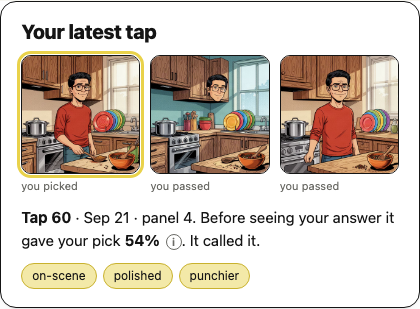
The single most recent tap, explained in plain language: what it guessed you’d pick before you picked, and whether it called it right. That guess is just sigmoid(w · x) again, computed the instant before your tap lands and never touched afterward, so “did it call it right” is a real, un-fudgeable prediction, not a retroactive one.
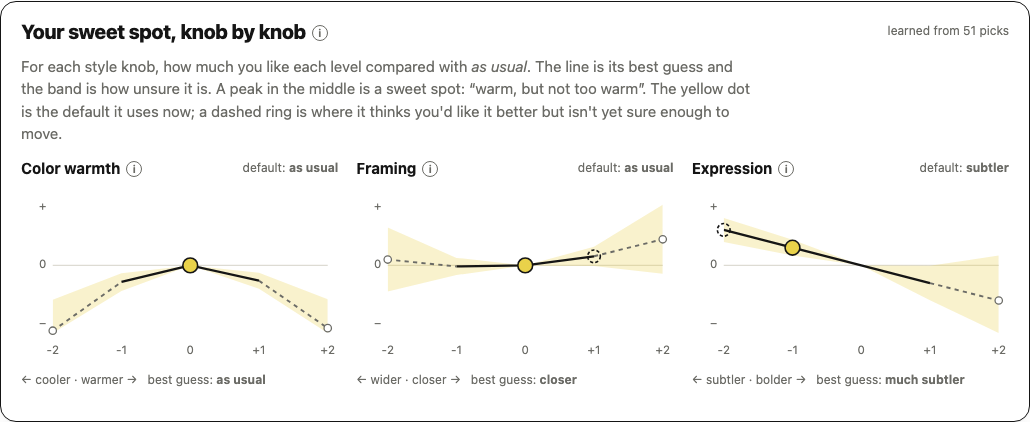
This is the part I get asked about most, and it’s a genuinely different model from the bars above, not because it needed to be fancier but because a linear model can’t represent “warm, but not too warm.” Give it only a straight-line weight per knob and the best it can ever say is “more is always better,” which for someone with an actual sweet spot pushes the default to the extreme and makes things worse than doing nothing at all. The fix is one extra term per knob, the level and the level squared:
φ(level) = [level, level²]
A negative weight on the squared term bends that straight line into a hill with a peak in the middle. Whether one knob’s new level beats its old one is read straight off that hill:
P(new beats old) = Φ( (μ · Δφ) / sqrt(Δφ · Σ · Δφ) )
(Φ here is the normal CDF, not sigmoid, same idea, different tail shape; Δφ is just φ(new) − φ(old).)
Worked example, warmth knob, checking “+1 warmer” against “as usual” (level 0): say the model has learned a weight of 0 on plain warmth but −0.8 on warmth-squared, no direction, but real curvature. Then:
Δφ = φ(1) − φ(0) = [1, 1]
mean = 0×1 + (−0.8)×1 = −0.80
With a posterior standard deviation around 0.55, that’s −0.80 / 0.55 ≈ −1.45, and Φ(−1.45) ≈ 7%. A 7% chance “warmer” beats “as usual” is nowhere near the 99% confidence the app requires before it’ll actually move your default, so it correctly does nothing, and “as usual” stays the default. That’s the curve in the screenshot: a peak sitting right at zero, because that’s genuinely where this knob’s hill is tallest.
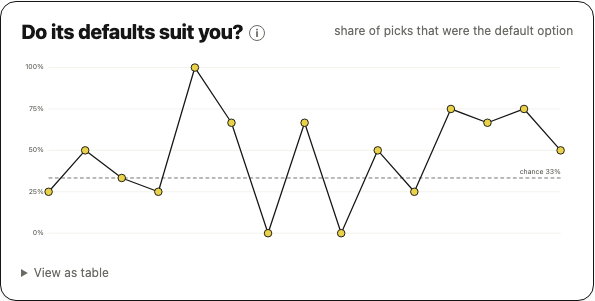
A day-by-day track of how often its default (unmodified) option is the one you actually kept. It should climb as the defaults get closer to your real taste, and if it doesn’t, that’s the model telling on itself honestly.
Three real confidence rules gate every default you see here: it needs 20 taps before it’s allowed to move at all, needs 99% confidence to move away from zero, and only 75% just to stay once it’s there, falling short means it drifts back toward plain. That gap between 99 and 75 is deliberate: entering a lean should be hard to earn and easy to lose, not the other way round. And because taste can genuinely change, every comparison feeding this chart is aged out on the way in:
weight(age) = 0.5 ^ (age / 80)
| age (taps) | weight |
|---|---|
| 0 | 1.00 |
| 20 | 0.84 |
| 40 | 0.71 |
| 80 | 0.50 |
| 160 | 0.25 |
A comparison 80 taps old counts for exactly half of a fresh one. Old taps never get deleted, they just quietly stop mattering, like most opinions.
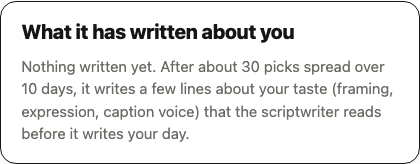
After enough picks, it writes a few short, plain-English notes about your taste and hands them to the script writer before it writes your next day. Not a dashboard number, actual sentences a model reads before drawing anything. There’s no new formula here; this is just the weights and knobs above, translated out of math and into English on your behalf, which is frankly more than I do for most of my own opinions.
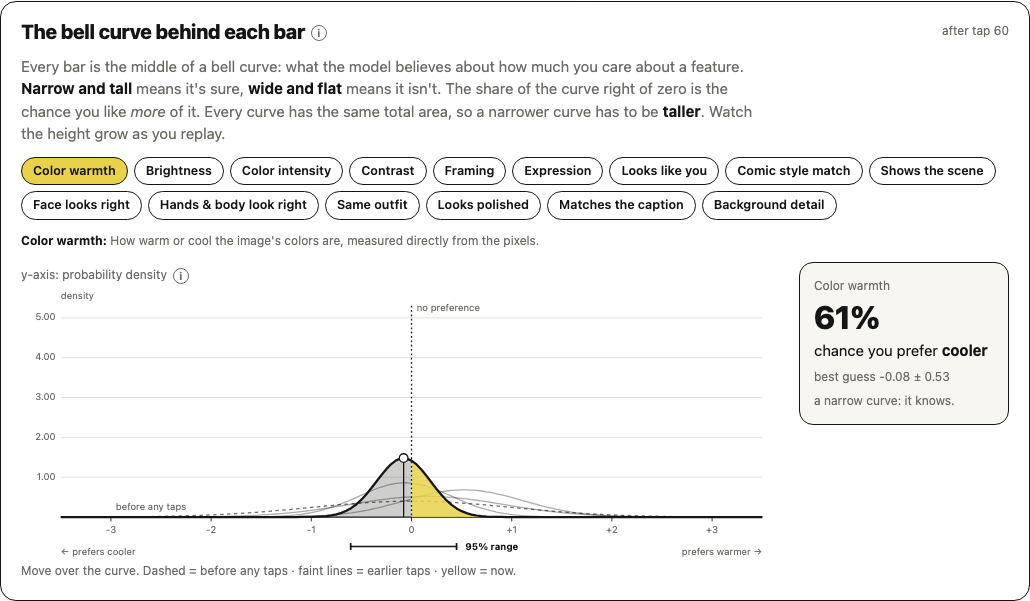
Every one of those bars from earlier is really the peak of a full bell curve underneath, literally the same mean/variance pair from the Newton update, drawn out. Narrow and tall means it’s sure; wide and flat means it isn’t, and you can watch that curve visibly narrow, tap by tap, as more evidence comes in.
That curve is also where the exploring happens. Instead of always acting on the mean, the app occasionally draws a plausible weight from this exact curve and acts on that instead:
w_sample = mean + std × z (z a fresh random draw from N(0, 1))
Worked example, using the 5-tap belief from earlier (mean 1.18, std ≈ 0.73): a real draw with z = 0.29 gives w_sample = 1.18 + 0.73 × 0.29 = 1.39, plausible, but not identical to the mean. A wider curve means a bigger std, which means draws land further from the peak, which means more exploring. The uncertainty on the chart is the exploration knob, for free.
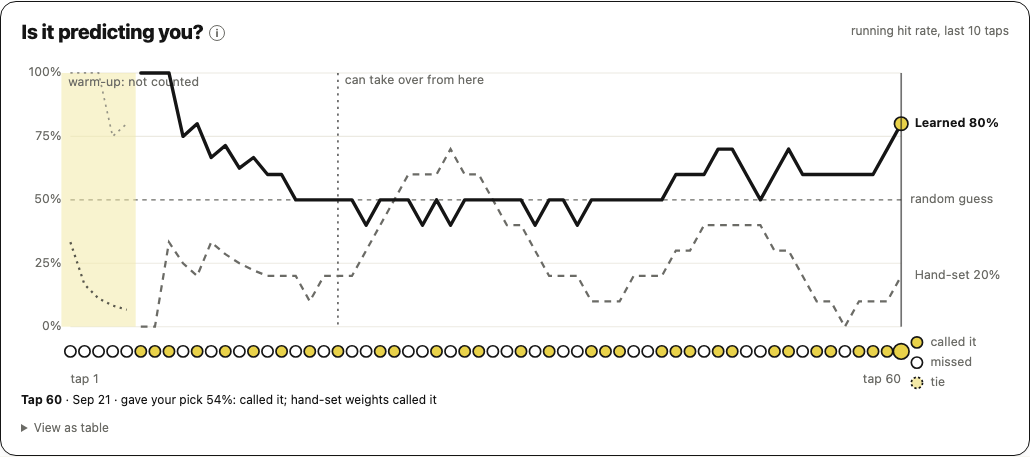
A rolling scoreboard: over your last ten taps, how often did the learned model call it correctly, against how often the plain hand-set weights would have. It only gets to take over once it’s genuinely, measurably ahead:
active ⟺ taps ≥ 20 AND (learned_correct − hand_set_correct) ≥ 3
Illustrative example of that check: 21 held-out taps, the hand-set weights call 13 of them right, the learned model calls 16 right. Net edge = 16 − 13 = 3, exactly enough to switch over. One fewer, and it stays benched. This chart is that same gate, running live, not just on the day it first switched on. “Trust it” is never assumed here; it’s re-earned every tap.
That’s the whole thing: a diary entry becomes a consistent character in a comic, and every tap you give it makes tomorrow’s strip a little more yours than today’s.
Thanks for reading this far, genuinely, past the sigmoid, that’s real commitment. If you want to actually poke at it without spending real API money, there’s a static demo: every real generated image, a real trained character, nothing costs anything to click. And if you want to run it for real, the repo’s yours to clone.
Do share your feedback and suggestions (if any) to my mail neerajpola2002@gmail.com.
“Seize the day, see the day, keep the day.”
Happy building!